When you take a photograph with a digital camera, you usually have a choice of saving the image as RAW, JPEG, or sometimes both. For beginners, the difference between these formats can be confusing.
RAW and JPEG files are created differently and offer different advantages. Choosing the right format depends on how you plan to use your photographs, how much editing you expect to do, and how much storage space you have available.
What Is a RAW File?
RAW Files Keep More Original Image Data
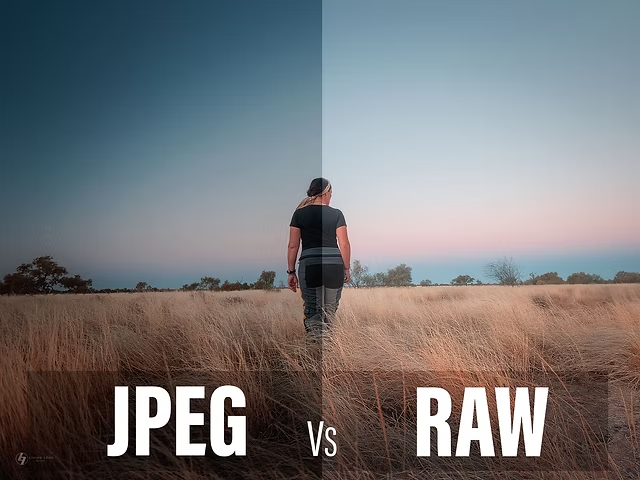
A RAW file contains much of the image data captured by your camera’s sensor before the camera applies the same level of processing that is typically applied to a finished JPEG.
This gives photographers more flexibility during post-processing.
RAW files are particularly useful when you want to make significant adjustments to exposure, white balance, highlights, shadows, and color.
RAW Files Are Not Usually Ready for Immediate Sharing
Unlike a typical JPEG, a RAW photograph may look relatively flat or less processed when opened in some software.
The file is designed to give you editing flexibility rather than necessarily being the final image.
You’ll generally need compatible photography software to process and export it into a more widely shareable format.
What Is a JPEG File?
JPEG Is a Processed and Compressed Image
JPEG is a widely supported image format used by cameras, phones, computers, websites, and social media platforms.
When your camera creates a JPEG, it processes the captured image according to its settings and then compresses the result.
The camera may apply adjustments related to color, contrast, sharpening, and other image characteristics before saving the final file.
JPEG Files Are Smaller
One major advantage of JPEG is its relatively small file size.
You can store more JPEG photographs on a memory card or hard drive compared with larger RAW files.
This can also make JPEG files easier to transfer and share.
RAW vs JPEG: The Main Difference
RAW Gives You More Editing Flexibility
RAW is generally the better option when you want maximum control during editing.
If you accidentally capture a photograph that is somewhat underexposed, a RAW file may give you more room to recover shadow detail than a JPEG.
Similarly, RAW files can provide greater flexibility when correcting white balance.
JPEG Is Convenient
JPEG is useful when you want photographs that are already processed and ready to use.
For example, if you need to quickly send photographs to someone without spending time editing each image, JPEG can be much more convenient.
RAW vs JPEG for Editing
RAW Is Better for Heavy Adjustments
Photographers who regularly edit their images in applications such as Lightroom, Photoshop, or other RAW-processing software often prefer RAW files.
You have more flexibility to make adjustments before exporting the final photograph.
This can be especially useful for professional portrait, wedding, commercial, and landscape photography.
JPEG Can Still Be Edited
Choosing JPEG does not mean you cannot edit your photographs.
You can still adjust exposure, contrast, color, cropping, white balance, and many other settings.
The difference is that JPEG has already gone through processing and compression, so there may be less original image information available for major corrections.
RAW vs JPEG for Wedding Photography
RAW Is Useful for Important Moments
Wedding photographers often prefer RAW because wedding venues can have difficult and rapidly changing lighting conditions.
You may photograph a bride in a bright outdoor area and then move into a darker reception hall.
Having more editing flexibility can be valuable when correcting exposure and color later.
JPEG Can Be Useful for Fast Delivery
If you need to provide photographs quickly, JPEG files are convenient because they are already processed and widely supported.
Some photographers also use cameras that can record both RAW and JPEG simultaneously.
This provides an edited-looking JPEG for quick use while retaining the RAW file for more detailed post-processing.
RAW vs JPEG for Social Media
JPEG Is Usually More Convenient
Social media platforms generally work with common image formats such as JPEG.
If your final image is going online, you will normally process your RAW photograph and export it as a JPEG or another suitable format before uploading.
Keep Your Original RAW Files
If you photograph important work in RAW, consider keeping the original files safely stored even after exporting your JPEGs.
You may want to re-edit the photographs in the future using improved software or a different editing style.
RAW vs JPEG File Size
RAW Files Take Up More Storage
Because RAW files retain more image information, they are typically much larger than JPEG files.
A long photoshoot can therefore consume a significant amount of storage space.
This is particularly important for wedding photographers or anyone who takes hundreds or thousands of photographs during an assignment.
JPEG Saves Storage Space
JPEG files are much smaller and can allow you to store more photographs on the same memory card or storage device.
However, storage should not be the only factor you consider when choosing a file format.
Can You Shoot RAW and JPEG at the Same Time?
Many Cameras Support Both Formats
Many interchangeable-lens cameras allow you to save both RAW and JPEG versions of the same photograph.
This can be a useful option if you want the convenience of JPEG while keeping the editing flexibility of RAW.
The disadvantage is that recording both files uses more storage space.
Choose the Combination Based on Your Workflow
If storage isn’t a major concern and you want maximum flexibility, shooting both can be a practical solution.
If you already have a streamlined RAW workflow, however, there may be little reason to create an additional JPEG for every photograph.
Which Format Is Better for Beginners?
Choose RAW If You Want to Learn Editing
If you’re learning Lightroom, Photoshop, or another RAW-processing application, shooting RAW can help you understand how much control you have over exposure and color.
It also gives you more flexibility when you make mistakes while learning.
Choose JPEG for Simple Photography
If you mainly take casual photographs and want to capture, share, and store them without spending time editing, JPEG may be more suitable.
There is no requirement for every photographer to shoot RAW.
Common Mistakes When Choosing RAW or JPEG
Assuming RAW Automatically Looks Better
A RAW file isn’t necessarily a finished photograph that will look better straight out of the camera.
It is better thought of as a file that gives you more information and flexibility for processing.
The final result depends heavily on how you process the image.
Deleting RAW Files After Exporting JPEGs
If the photographs are important, don’t automatically delete your original RAW files after creating JPEG versions.
Keep backups if you have enough storage, particularly for professional work.
Ignoring Your Storage Requirements
RAW photography can quickly fill memory cards and hard drives.
Make sure you have enough storage for your camera’s file sizes and the amount of photography you plan to do.
RAW vs JPEG: Quick Comparison
| Feature | RAW | JPEG |
| Image processing | Minimal camera processing | Camera processed |
| File size | Larger | Smaller |
| Editing flexibility | High | More limited |
| Ready to share | Usually needs processing | Yes |
| Storage requirement | Higher | Lower |
| Best for | Professional editing | Quick use and sharing |
So, Which Should You Use?
Use RAW If You Want Maximum Control
RAW is generally the better choice if you plan to edit your photographs extensively or need the greatest flexibility for correcting exposure and color.
It is particularly useful for professional photography and important assignments.
Use JPEG If Convenience Matters Most
JPEG is a good option when you want smaller files that are already processed and easy to share.
For everyday photography, casual shooting, and situations where you don’t plan to perform significant editing, JPEG can be perfectly adequate.
Consider Shooting Both
If you’re unsure, check whether your camera supports simultaneous RAW and JPEG recording.
This allows you to have both options, although it will require more storage space.
Final Thoughts
RAW and JPEG aren’t competing formats where one is always better than the other. They are designed for different workflows.
RAW gives you greater editing flexibility and retains more original image information, while JPEG provides smaller, processed files that are convenient to store and share.
If you’re serious about learning photography and editing, RAW is worth exploring. If you want simplicity and quick results, JPEG may be all you need.
The best choice is ultimately the one that fits your photography workflow.